This feature is available in the PerfectApps On-Demand version.
PerfectApps Artificial Intelligence builds connections and actions for you — just provide a few key details and it does the rest.
The AI Connection Builder button  can be found in the left hand panel of the Connections Dashboard.
The AI Connection Builder can be used to help create connections:
•REST Web Services
•SOAP Web Services
•Apps
•Databases
•Directory Services
•Text Files
Or just ask a question.
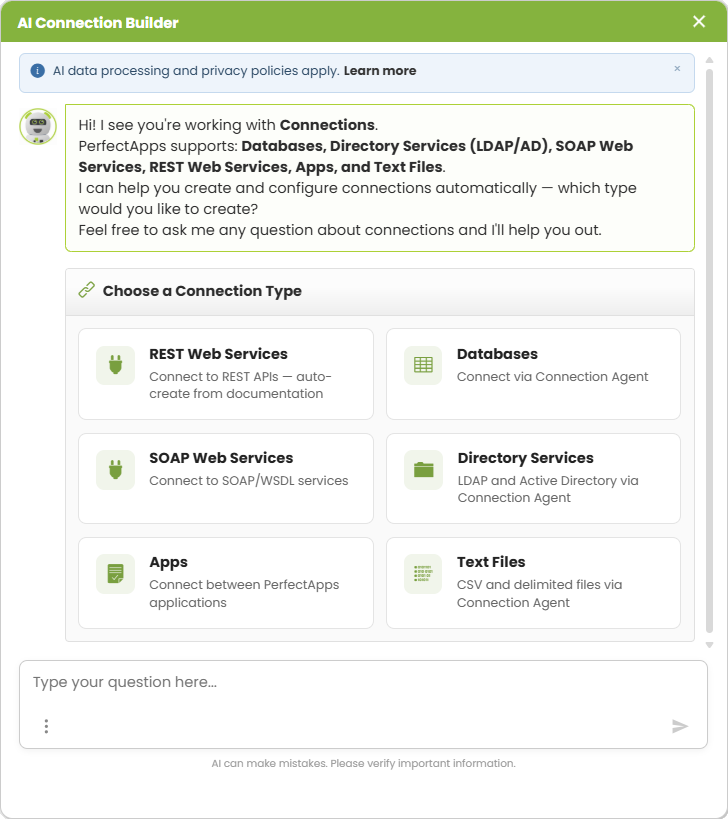
Choose a connection type and follow the instructions to let the AI Connection Assistant build connections for you.
You will typically be asked to enter credentials for the connection and the assistant will do the rest. Save time by having your credentials ready.
 |
Please provide the AI Connection Assistant with one of the following: • A link to the API documentation • A specification file (.yaml, .yml, .json, .xml) • A cURL command example • Or just describe the API (base URL, endpoints, authentication) |
 |
Please provide the AI Connection Assistant with all of the following: • A connection name • The Connection Agent URL • The database username • The database password |
 |
Please provide the AI Connection Assistant with one of the following: • The WSDL URL for the service • A specification file (.wsdl .xml) • Or describe the service (URL, operations, authentication) |
 |
Please provide the AI Connection Assistant with all of the following: • A connection name • The Connection Agent URL • The database username • The database password |
 |
The AI Connection Assistant will search the system for all apps available to connect to, giving each a unique number. Pick a number, or then name for the app you want to connect to. Let the assistant know which actions you would like to perform: • READ - Query existing instances • INSERT - Create new instances • UPDATE - Modify existing instances |
 |
Please provide the AI Connection Assistant with all of the following: • A connection name • The Connection Agent URL • The database username • The database password |
 |
If you don't want a connection set up for you, feel free to ask any question about connections — setup, troubleshooting, configuration, or anything else. |
|
AI Connection Builder (5 min) |
Build connections and actions with AI — just supply a few key details. Watch the tutorial to see how. |

For more information on connections see: PerfectApps Connections
Return to: Resources