You can delegate sorting of a column in a Data List/Grid to another column.
Example
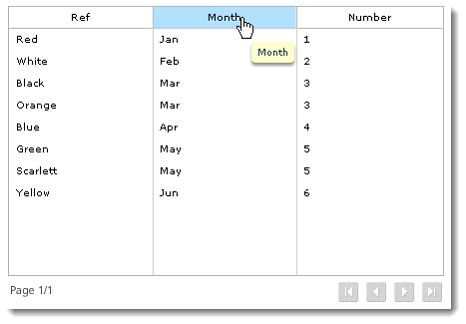
Your app collects Month data from a drop-down, list, or radio button group. The data pairs in the object are Jan | 1, Feb | 2, Mar | 3, Apr | 4, and so on.
In the report Data List/Grid, you would have a column for Month (Caption of list) and a column for the Month Number (Value of list).
In the Month Number column properties, select the sort as Ascending. In the Month column, select to delegate the sort to the Month Number column. When you click the Month column header, it will sort as expected by the numeric value: 1, 2, 3, etc., based on the value in the Month Number column, not alphabetically by the text in that column.
In this example, it would be typical, but not necessary, to hide the Month Number column.
See also: Exporting Data From a Data List or Grid
Return to: Adding Objects to Your Report, Designing a Report